How it works
Set up once, in about five minutes.
Install and connect a provider
Once Backlog Whisper lists on the Atlassian Marketplace you will install it from there, then choose your AI provider and paste your own API key. Nothing is analyzed until you do. The key is yours, and so is the bill.
Add your context
Tell it what you build, which jurisdictions you operate in, and the rules your team works to. That context is what separates a useful finding from generic advice.
Scan a sprint or the whole backlog
Run a scan from the button, on a single sprint or across the entire backlog. Findings arrive as whispers you can act on, add to the backlog, or dismiss. Analysis runs on your own API key, and stories you edit can be re-scanned, so what you spend follows how much your backlog moves.
Anatomy of a whisper
What is a Whisper?
A whisper is not an alert you have to go and interpret. It says what it found, what to do about it, why it is worth your sprint capacity, and gives you one step to turn it into work.
Hover a number to see what that part of the card is for.
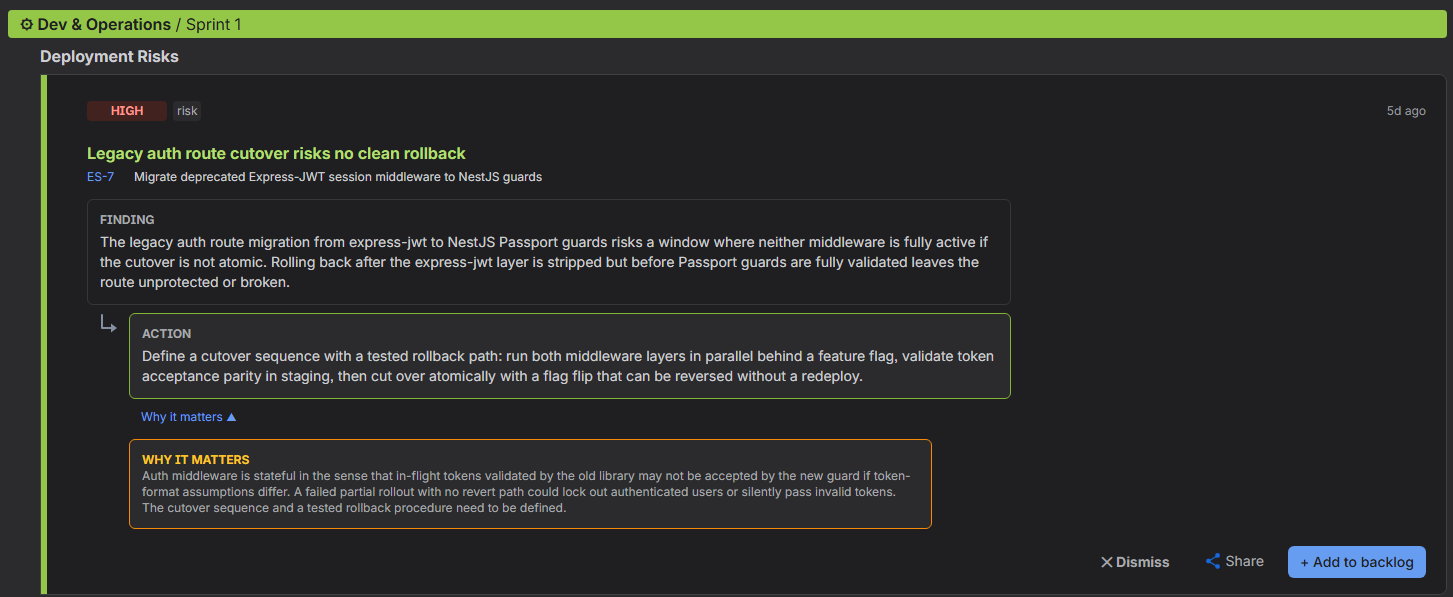
Finding
What was actually spotted, in that story's own terms rather than as a generic warning. It names the story it came from, so you can judge whether it is real without opening anything else.
Action
The concrete next step, written as work somebody can pick up. Phrased as a task rather than as advice, which is what makes it safe to drop straight into the backlog.
Why it matters
Collapsed until you ask for it, because you only need it when you are deciding. It gives the reasoning: what goes wrong if this is left alone, and what it costs to fix later instead of now.
Dismiss
For a whisper that does not apply to you. You say why, and that reason is what stops the same finding being raised again on the next scan.
Share
Passes the whisper on as it is, so whoever owns the risk reads the finding, the action and the reasoning rather than a paraphrase of them.
Add to backlog
Turns the whisper into real work: a new task, a subtask of the story it came from, or a comment on that story. You see and can edit every field before anything is written to Jira.
- 1
Finding
What was actually spotted, in that story's own terms rather than as a generic warning. It names the story it came from, so you can judge whether it is real without opening anything else.
- 2
Action
The concrete next step, written as work somebody can pick up. Phrased as a task rather than as advice, which is what makes it safe to drop straight into the backlog.
- 3
Why it matters
Collapsed until you ask for it, because you only need it when you are deciding. It gives the reasoning: what goes wrong if this is left alone, and what it costs to fix later instead of now.
- 4
Dismiss
For a whisper that does not apply to you. You say why, and that reason is what stops the same finding being raised again on the next scan.
- 5
Share
Passes the whisper on as it is, so whoever owns the risk reads the finding, the action and the reasoning rather than a paraphrase of them.
- 6
Add to backlog
Turns the whisper into real work: a new task, a subtask of the story it came from, or a comment on that story. You see and can edit every field before anything is written to Jira.
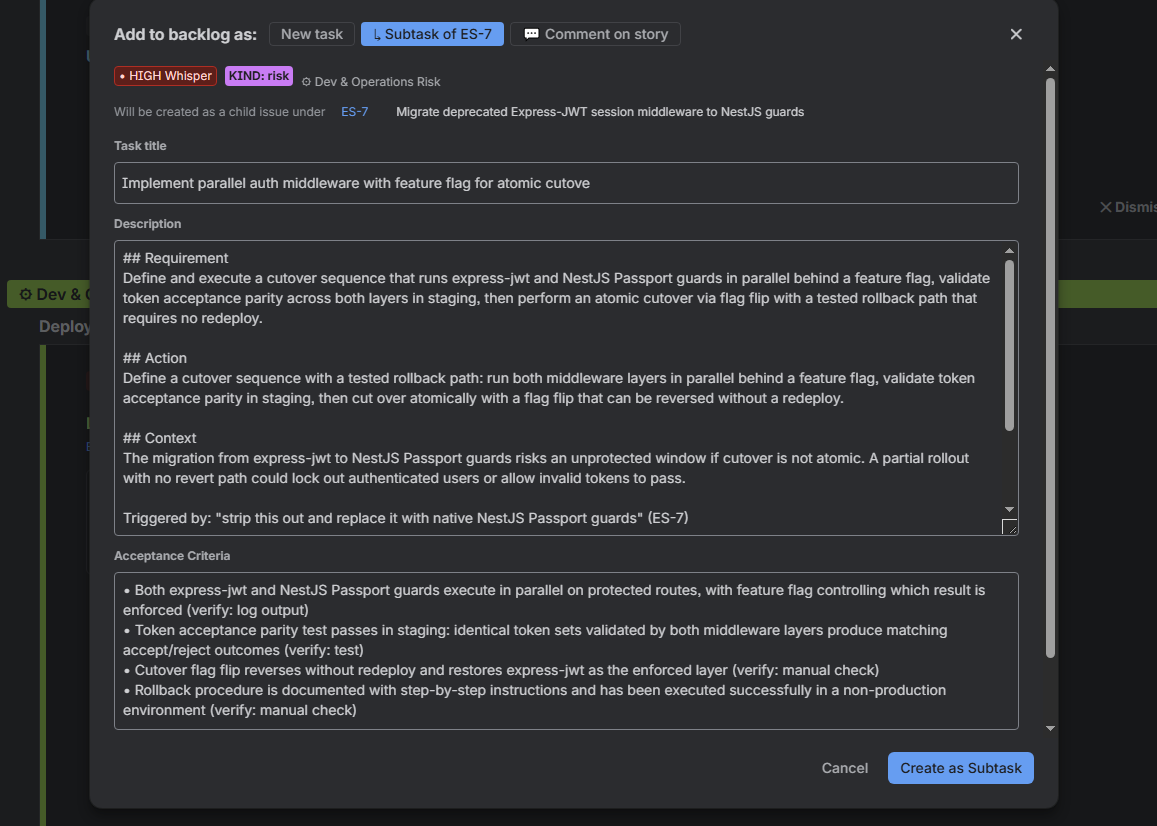
The "Add to backlog" super simple work flow.
We do the writing for you. One press turns the whisper into a drafted task: a title, a description carrying the requirement, the action and the context behind it, and acceptance criteria that are already checkable. Nothing is created until you press the button, and every field is yours to edit first.
Every whisper, at a glance
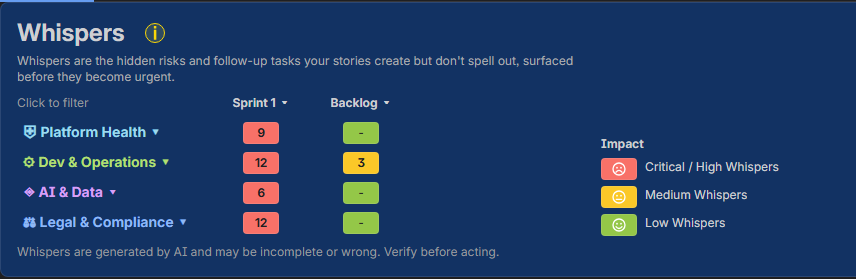
See the whole backlog risk picture in one matrix.
Findings are grouped by severity and category, so you can tell at a glance whether a sprint is carrying a handful of low-risk notes or a critical compliance gap.
Also included: Tech Tracer
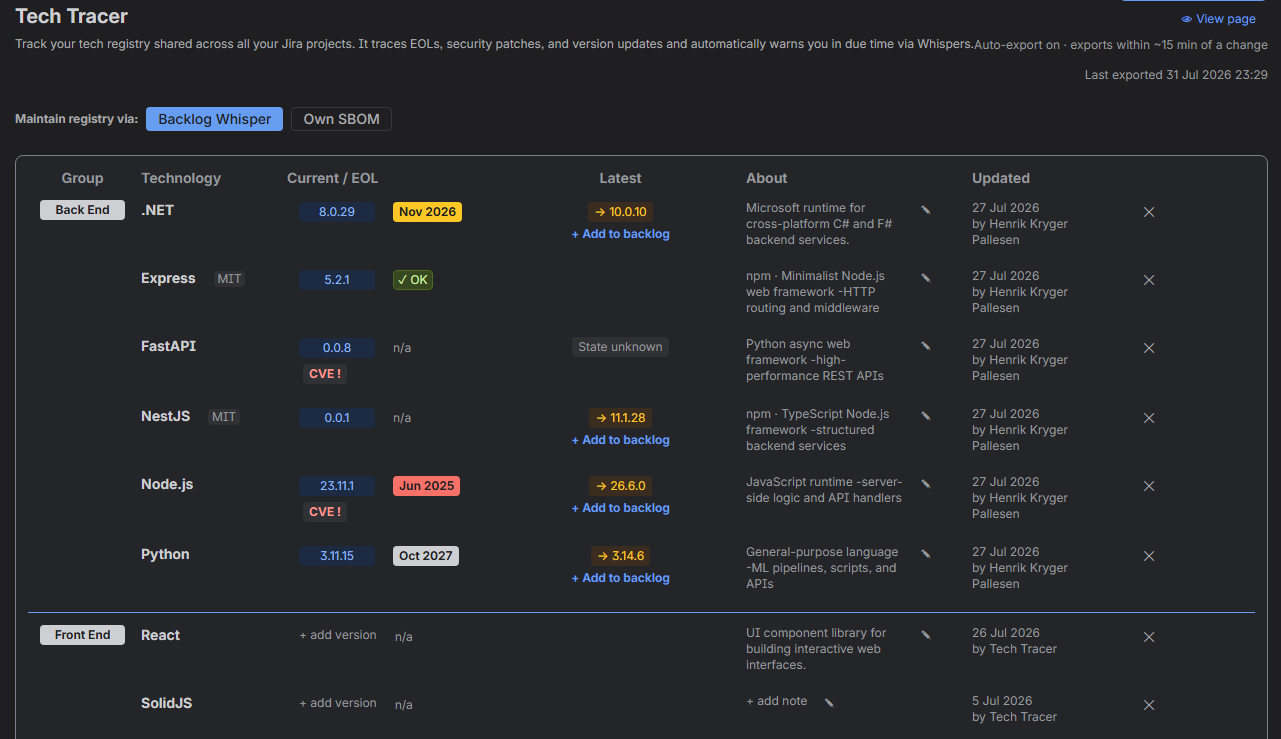
Automatic tech registry health surveillance
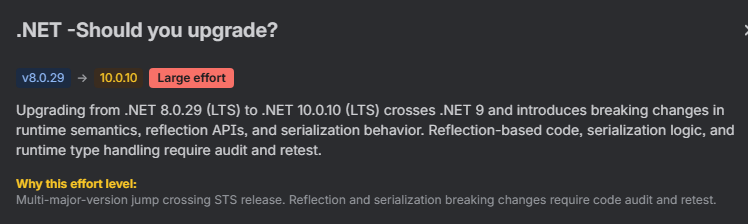
Stop being surprised by outdated libraries. Register the technologies you run and our Tech Tracer automatically alerts you in due time about end-of-life dates, known CVE vulnerabilities from the OSV database, and certificate and domain expiry dates.
What we look for
A comprehensive risk landscape.
Compliance & Legal
Platform Health
DevOps & Tech Debt
AI & Data Security
Security Vulnerabilities
Delivery & Coordination
Compliance frameworks are part of the paid edition.
Data protection
Where your backlog data goes, and how it is used.
Backlog Whisper is powered by an external LLM that runs outside Jira, on an account that belongs to you. Your backlog stories do leave Atlassian, but they go to your own provider under your own API key, and they never touch Backlog Whisper's systems.
You choose the provider, and you hold the key
Analysis runs against Anthropic, Google, OpenAI or Mistral, whichever you configure, using an API key you supply. Your content is not routed through our servers, and we do not resell inference.
Personal data is masked before it leaves Atlassian
Email addresses, phone numbers, card numbers, IBANs, national ID numbers, IP addresses and the display names of the people on an issue are replaced with neutral placeholders on the way out. The real values are put back only in the result shown to you in Jira. Masking is a best-effort pattern match rather than a guarantee, so treat it as a substantial reduction in exposure, not as a promise that nothing personal can ever slip through.
A per-story opt-out you control
Add the label "pii" to any Jira story and only its title is sent for analysis. The description and acceptance criteria are withheld entirely.
It runs on Atlassian Forge
Results are stored in Forge storage inside your Atlassian environment for as long as the app is installed. Optional integrations such as Confluence context and Slack notifications do nothing until you switch them on.
You are reading AI-generated output
Whispers are produced by a large language model reasoning over the text you give it. It does not read your source code, it will sometimes miss a real risk, and it will sometimes raise something that turns out not to apply. Treat it as a second pair of eyes on planning, not as an audit and not as legal advice. The decision stays yours.
A note on limitations
Garbage in, garbage out.
The quality of the findings depends on the quality of the story. A two-line story without acceptance criteria will not produce useful whispers. A well-written story with clear scope, context, and acceptance criteria will catch what you would miss by hand.
You supply your own AI provider key, so the analysis is billed to you directly.